
Businesses today expect more from a website than an attractive design. A modern website should generate enquiries, support sales, rank in search engines, build credibility, and grow alongside the business. The platform you choose plays an important role in making all of this possible.
WordPress has become the world’s most widely used content management system because it offers the flexibility to create websites that are easy to manage, highly customizable, and capable of supporting businesses of every size. However, simply choosing WordPress is not enough. The real difference lies in how the website is planned, developed, and maintained.
This guide explores the essential features every professional WordPress website should include and explains why each one matters from a business perspective.
Why WordPress Continues to Be the Preferred Website Platform
WordPress powers millions of websites worldwide, ranging from small local businesses to global enterprises. Its popularity is driven by several practical advantages:
- Easy content management without technical knowledge
- Extensive customization options
- Strong SEO capabilities
- Large ecosystem of plugins and integrations
- Excellent scalability
- Active community support
- Freedom from vendor lock-in
More importantly, WordPress allows businesses to evolve their websites over time instead of rebuilding them whenever requirements change.
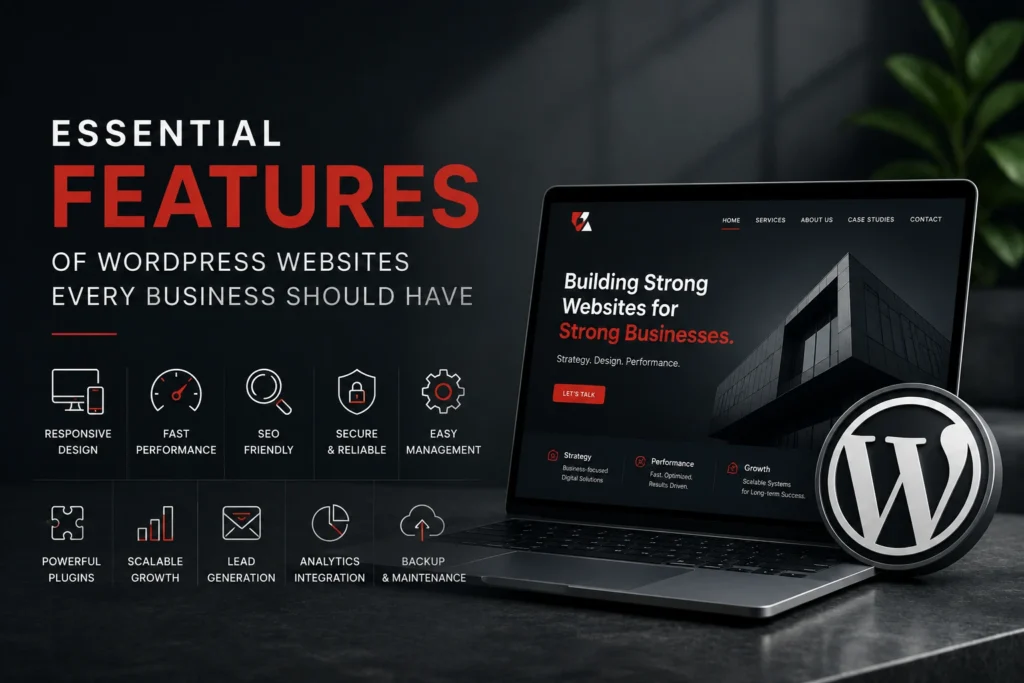
WordPress Website Features Every Business Should Have
WordPress website features play a major role in determining your website’s performance, security, SEO, and user experience. Whether you’re building a new website or improving an existing one, understanding these essential WordPress website features will help you create a website that supports long-term business growth.
1. Easy Content Management
One of WordPress’s greatest strengths is its intuitive content management system.
Business owners and marketing teams can:
- Publish blog articles
- Update service pages
- Add new products
- Replace images
- Edit company information
- Create landing pages
without depending on a website developer for every small change.
Keeping content up to date helps maintain accuracy, improves SEO, and allows businesses to respond quickly to market changes.
2. Responsive Design Across All Devices
More than half of website traffic now comes from mobile devices. A professional WordPress website should automatically adapt to desktops, tablets, and smartphones without compromising usability.
Responsive design improves:
- User experience
- Readability
- Navigation
- Conversion rates
- Search engine rankings
Google also uses mobile-first indexing, making mobile performance an essential consideration rather than an optional feature.
3. SEO-Friendly Architecture
A well-built WordPress website provides a strong foundation for search engine optimization.
Important SEO features include:
- Clean URL structures
- Optimized heading hierarchy
- XML sitemaps
- Meta titles and descriptions
- Image optimization
- Schema markup
- Internal linking
- Fast page loading
These elements help search engines understand your content while improving your visibility for relevant searches.
4. Fast Website Performance
Website speed directly affects user experience and business performance.
Research consistently shows that slow websites experience:
- Higher bounce rates
- Lower conversion rates
- Reduced customer satisfaction
- Lower search rankings
Professional WordPress websites should include:
- Optimized images
- Browser caching
- Efficient code
- Content Delivery Networks (CDNs)
- Core Web Vitals optimization
Fast websites not only improve SEO but also create a better first impression.
5. Strong Security
Every website faces security risks, regardless of its size.
WordPress itself is secure when maintained correctly, but professional implementation should also include:
- SSL certificates
- Secure hosting
- Regular software updates
- Malware scanning
- Firewall protection
- Automated backups
- Strong user access controls
A proactive approach to security protects customer data, maintains business continuity, and reduces the risk of costly downtime.
6. Flexible Design and Customization
Every business has unique goals, branding, and customer journeys.
WordPress provides the flexibility to build websites tailored to those requirements instead of forcing businesses into rigid templates.
Whether you need:
- Corporate websites
- Service websites
- Manufacturing websites
- Portfolio websites
- E-commerce stores
- Knowledge centres
- Landing pages
WordPress can be customized to support your objectives while maintaining a consistent brand identity.
7. Powerful Plugin Ecosystem
WordPress offers thousands of plugins that extend website functionality without requiring custom development for every feature.
Common business integrations include:
- Contact forms
- CRM systems
- Email marketing platforms
- Appointment booking
- Payment gateways
- Analytics tools
- Live chat
- Marketing automation
The goal is not to install as many plugins as possible but to choose reliable solutions that solve real business problems.
8. Scalability for Future Growth
Many businesses begin with a simple website but later expand into:
- Multiple service areas
- Online stores
- Resource libraries
- Customer portals
- Membership websites
- Learning platforms
- Multi-location businesses
WordPress supports this growth without requiring a complete rebuild, making it a practical long-term investment.
9. Analytics and Performance Tracking
Business decisions should be based on data rather than assumptions.
A professional WordPress website can integrate with tools such as:
- Google Analytics
- Google Search Console
- Conversion tracking platforms
- Heatmap software
- Call tracking systems
These insights help businesses understand:
- Where visitors come from
- Which pages perform best
- How users navigate the website
- Which marketing campaigns generate enquiries
10. Lead Generation Features
A business website should actively support sales, not simply provide information.
Effective WordPress websites often include:
- Contact forms
- Quote request forms
- Consultation booking
- Downloadable resources
- Newsletter subscriptions
- Clear call-to-action buttons
- Live chat
Each feature should guide visitors toward taking the next step in the buying process.
11. Easy Maintenance and Long-Term Reliability
Launching a website is only the beginning.
Ongoing maintenance ensures that the website remains:
- Secure
- Fast
- Compatible with modern browsers
- Free from software conflicts
- Optimized for search engines
Regular updates, backups, monitoring, and performance reviews help prevent small issues from becoming costly problems.
Choosing the Right WordPress Development Partner
The success of a WordPress website depends less on the platform itself and more on the expertise behind its implementation.
When selecting a development partner, consider whether they focus on:
- Understanding your business goals
- Creating a user-friendly experience
- Optimizing for speed and SEO
- Implementing strong security practices
- Planning for future scalability
- Providing ongoing support
A strategic partner will build a website that supports your business long after launch.
Final Thoughts
WordPress remains one of the most powerful platforms for building professional business websites. Its flexibility, scalability, and extensive ecosystem make it suitable for organizations of all sizes. However, the platform alone does not guarantee success.
A successful WordPress website combines thoughtful planning, user-focused design, technical excellence, strong security, and ongoing optimization. When these elements work together, your website becomes more than an online presence—it becomes a valuable business asset that attracts visitors, generates leads, and supports long-term growth.
Frequently Asked Questions
What makes WordPress a good choice for business websites?
WordPress is flexible, scalable, SEO-friendly, and easy to manage, making it suitable for businesses ranging from startups to large enterprises.
Can I update my WordPress website without coding?
Yes. WordPress allows you to update content, images, blog posts, and pages through an intuitive dashboard without needing programming knowledge.
Is WordPress secure?
Yes, when properly maintained. Regular updates, secure hosting, SSL certificates, backups, and security monitoring are essential for keeping a WordPress website safe.
How does WordPress help with SEO?
WordPress supports clean URLs, metadata management, schema markup, XML sitemaps, internal linking, and integrates well with SEO tools, helping improve search engine visibility.
Can WordPress grow with my business?
Absolutely. WordPress can scale from a simple brochure website to a complex e-commerce platform, membership site, or multi-location business website without requiring a complete rebuild.